
Group Size Calculator - V2.4
-- now supports metric measurements --
Occasional Installation Issues

 |
If you have access to a scanner, you can scan your targets into a
"*.bmp", "*.jpg", or "*.gif" file then open this file with the GSC program. Then, simply by left-clicking
when the cursor is centered on top of each bullet hole, the X-Y coordinates are
measured. The GSC allows you to calibrate your scanner and display such that
at maximum resolution accuracy to +/- 0.001 inch is possible. To measure
accurately you must calibrate your scanner / monitor. This calibration
is only available in the registered version.
Setting your magic number |
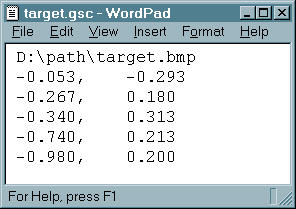 |
Without a scanner, you are still able to use the GSC to calculate
your group statistics. Using a good caliper, measure the X and Y coordinates
of each shot and place them in a text file. Then open this file with the GSC.
One can also hold a target up to the monitor and position the cursor underneath each bullet hole and click - this is less accurate due to parallax, but with practice can suffice. The monitor still needs to be calibrated - one can hold a ruler to the screen and use a method similar to that described in Setting your magic number. In addition, the GSC scanning window needs to be sized such that it encompasses the desired portion of the target. |
 |
Using either of the capture methods above, the GSC then displays a representation of your target. If you so choose, you can elect to remove any of the shots from the group calculations (e.g. in the case of a known flier). |
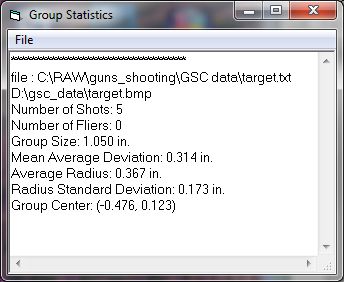 |
The GSC then calculates the following statistics for your group:
|